VidSeen: record, share, and verify who watches your videos
Capture a tab, window, or entire desktop and generate an instant share link that reports who opened and completed the video. VidSeen, from Indysoft, Inc., installs as a Chrome extension and pairs with Mac and Windows desktop apps to keep a synced capture library. The app includes screenshot modes, markup tools, keyboard shortcuts, and automated reminders for recipients who haven't viewed shared content, aimed at professionals and remote teams who require confirmed engagement.
Designed around proof of viewing, not just capture
VidSeen focuses on viewer confirmation by attaching analytics to every shared link: after you send a recording or screenshot link, the app shows who opened it and who finished watching. That tracking model separates it from ordinary record-and-upload tools and suits use cases where a sender needs explicit evidence that a recipient engaged with a visual update or instruction.
Capture modes and quick-access controls speed common tasks
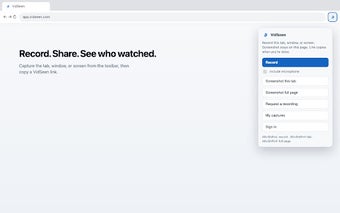
Recording and screenshot options cover typical workflows: tab, window, or full-screen recording; full-page and visible-area screenshots; and annotation tools for images. The extension exposes keyboard shortcuts (Alt+Shift+L, Alt+Shift+V, Alt+Shift+F) so users can start captures without navigating menus, which helps when making frequent, short recordings or rapid annotated screenshots.
Tracking, reminders, and library sync connect browser and desktop
Link-based sharing pairs with viewer analytics and reminders. The app creates instant links to avoid manual file uploads, then sends automated reminders to recipients who haven't viewed content. Captures save to a cloud library that syncs with VidSeen’s Mac and Windows applications after sign-in, keeping items accessible across the Chrome extension and desktop clients.
Privacy trade-offs and transparency around tracking
Viewer tracking is explicit and central to the tool, since proofs of engagement require that recipients open the shared link. The app reports who opened and completed videos, which supports accountability but means shared links carry identifiable analytics; the extension’s value depends on senders and recipients accepting that tracking model.
Useful for teams that need verifiable viewing, with an explicit tracking trade-off
VidSeen suits professionals and educators who need documented confirmation that recipients viewed instructional videos or screenshots, because it reports both opens and completions and issues reminders. The requirement to sign in for library sync and the link-based tracking model are deliberate design choices, so teams that need proof of engagement benefit most, while those who avoid tracked links may find the approach unsuitable.